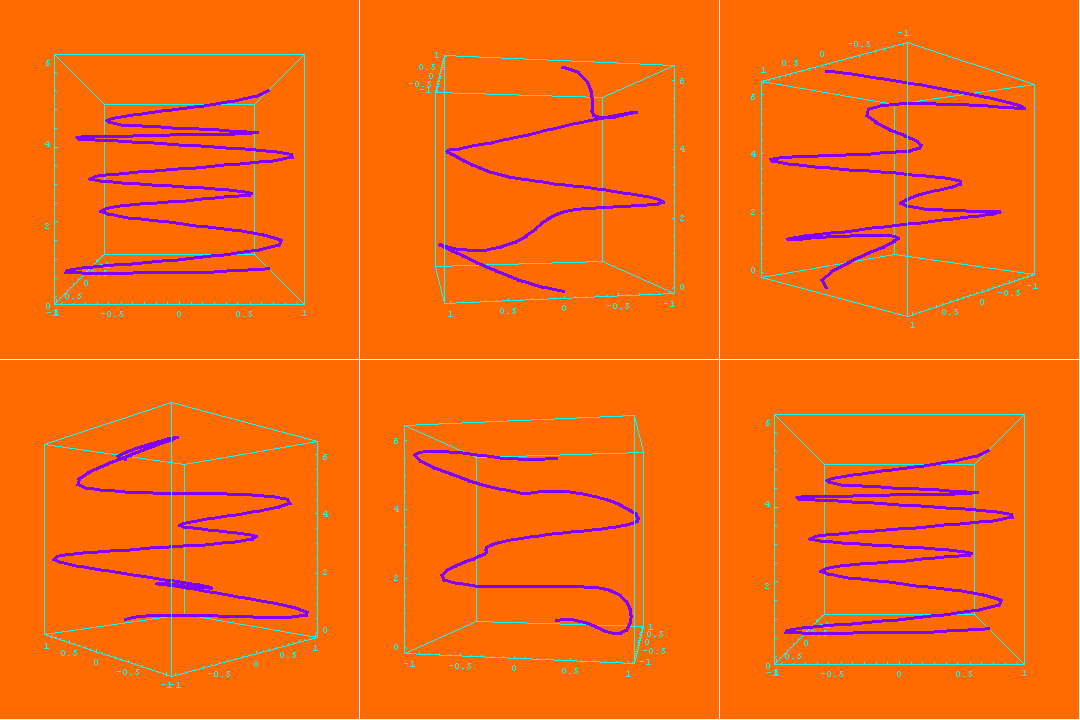
The 3-dimensional curve
  ParametricPlot3D[
    {Sin[2t], Cos[5t], t, {Hue[.75], Thickness[.01]}},
    {t,0, 2*Pi}, BoxRatios -> {1, 1, 1},
    ViewPoint -> {2, 3, 0}, Background -> Hue[.07]],
can be spun (around the z-axis)by
  Table[
    ParametricPlot3D[{Sin[2t], Cos[5t], t, {Hue[.75], Thickness[.01]}},
      {t,0, 2*Pi}, BoxRatios -> {1, 1, 1},
      ViewPoint -> {2*Cos[Theta], 3*Sin[Theta], 0},
      Background -> Hue[.07],SphericalRegion -> True],
  {Theta, 0, 2*Pi, 2*Pi/35}]
(The modifier SphericalRegion->True helps to render each graph in the table in a consistent fashion.) The resulting animation looks like:
One can also spin the curve by using the command SpinShow. To use this command it is first necessary to load the Animation graphics package by
<<Graphics`Animation`
Then enter
  gg = ParametricPlot3D[
         {Sin[2t], Cos[5t], t, {Hue[.75], Thickness[.01]}},
         {t, 0, 2*Pi}, BoxRatios -> {1, 1, 1},
         ViewPoint -> {2, 3, 0}, Background -> Hue[.07]]
and
  SpinShow[gg, Frames -> 35, SpinRange -> {0 Degree, 360 Degree},
    SpinTilt->{10 Degree, 15 Degree}]
URL: http://math.ou.edu/~amiller/math/pplot3.htm
November, 1999